
Inheriting a project is always hard. No matter what, this job usually has to be done by engineers.
In the AI era, AI can generate a lot of code — but there’s an important difference: AI output is often a black box. It may come with documentation, but you can only trust part of it. Hand-crafted code often contains the author’s non-standard design choices and clever tricks. Whether those choices are good or bad, they make the project *malleable* in a way AI-generated code often is not.
What this means: AI might hand you a 3MB codebase that runs, but if you’ve never seen its structure, asking AI to make precise changes becomes nearly impossible. By contrast, a project you’ve built up from zero feels much more comfortable to change.
So — taking over someone else’s project is a specialized skill. It’s important whether the project was originally written by humans or AI. Here are practical notes (based on a good article by “ChuGuo’s Hermit” on cnblogs) and my own tips.
—
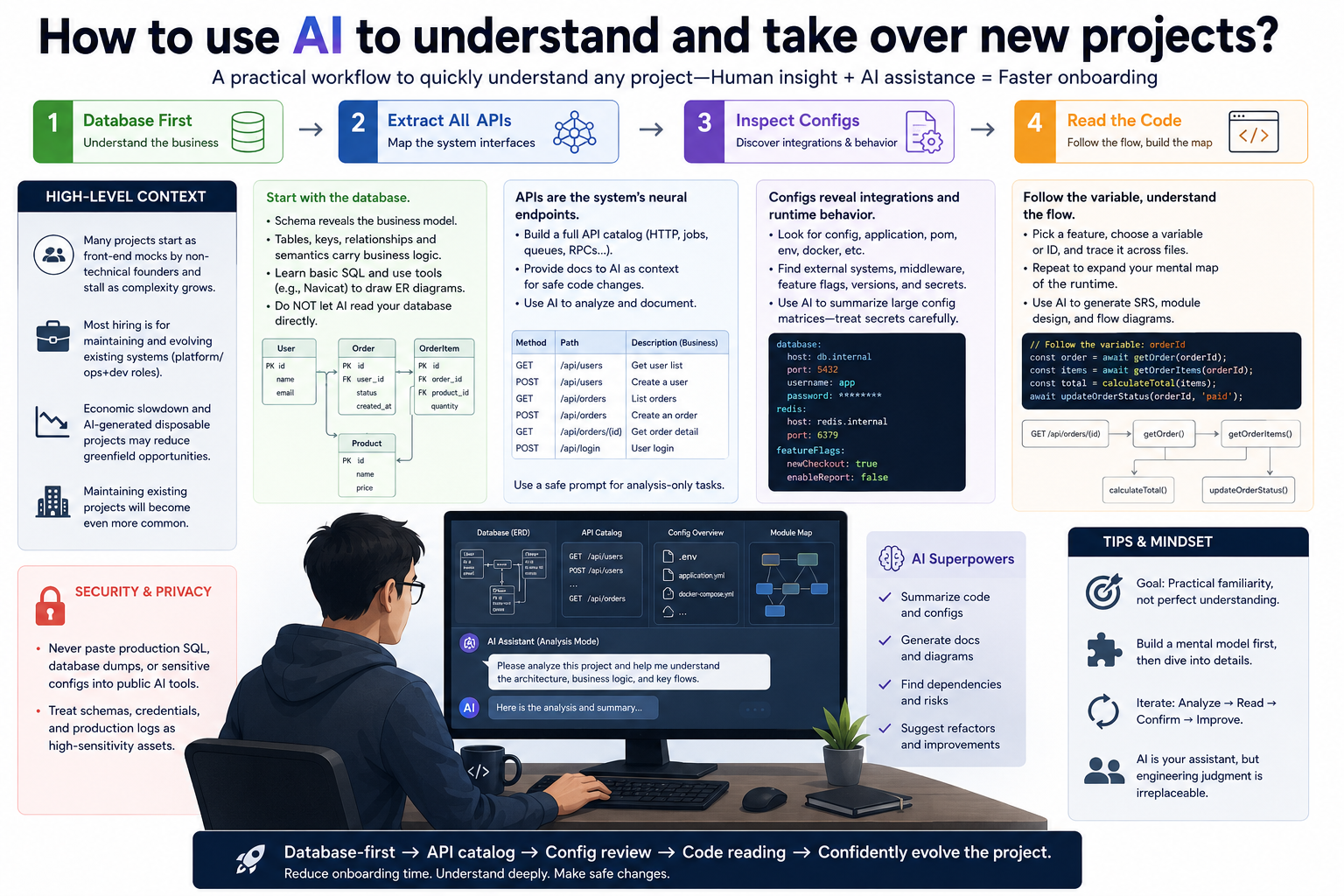
## High-level context
– In the AI era many non-technical founders produce projects that are basically a front-end mock; once the product complexity increases, progress often stalls.
– Most hiring is not for greenfield development, but for maintaining and evolving existing systems — the so-called platform/ops+dev roles.
– With economic slowdown and lots of AI-generated disposable projects, greenfield opportunities may shrink; maintaining existing projects will become even more common.
—
## 1) If you’re a beginner: start with the database
Reality (the business) is built on data. The first step in understanding a project is to understand its database.
– Look at the database schema first. A database often reads like an Excel workbook; its schema reveals the underlying business model.
– Table design, keys, relationships, constraints, and field semantics carry a lot of business logic. Leak of schema is often a major security risk. Don’t expose SQL or schemas publicly.
– If you’re new, learn basic SQL first — a few hours will take you a long way. Understanding primary keys, foreign keys, indexes, and common field semantics gives you the project’s skeleton to build on.
– If the project is important, avoid letting AI “read” your database directly — schema and SQL are often highly sensitive.
– Tip: use tools like Navicat or similar to generate ER diagrams and visualize table relationships.
—
## 2) Next: extract and document every API (use AI for this step)
If API documentation already exists, great — skip this step. If not, this is crucial:
– Generate a full API catalog (HTTP endpoints, auth, payloads, responses), because APIs are the project’s neural endpoints.
– Provide AI with API docs as context when you want it to make code changes — that’s far better than letting it re-interpret raw source code repeatedly.
– API docs are also a safe, high-value context layer to hand to AI for automation tasks.
Example prompt to ask AI (safe, analysis-only):
– “Please analyze this Next.js route handler (API route): 1) Group endpoints by business module. 2) Output a Markdown table with columns: path, HTTP method, description of business function. 3) Based on logic, parameters, and returns, infer the real-world business operation and scenario for each endpoint. 4) Only provide technical and business logic analysis — do not execute, reproduce, or generate runnable business code.”
Include all API types — not just HTTP (e.g., background jobs, message queues, RPCs).
—
## 3) Inspect configuration files
Configuration reveals integration points and runtime behavior.
– Search for files or directories containing keywords like `config`, `application`, `pom`, `env`, or `docker`. These files are often JSON, YAML, or properties files.
– Config files show external systems the app talks to, middleware, feature flags, framework versions, and third-party services.
– Large enterprise projects may have massive config matrices; here, using AI to summarize and index config entries can save time, but treat secrets carefully.
—
## 4) Start reading the code (practical strategies)
After the first three steps you should have a mental model of the system. Reading source code is the main task for engineers — it’s what most of our careers are made of.
If you’re less experienced, use the “follow the variable” technique:
– Pick a part of the app you can understand (any small feature).
– Choose a variable, function, or ID you can identify in that feature, and trace where it’s defined and used.
– Follow that “thread” across files and modules until you reach the edges of your understanding. Repeat this process a few times. Each pass expands your mental map of the runtime flow.
– This approach is slow but reliable; after a few passes you’ll understand most of the runtime logic.
Other useful tactics:
– Ask AI to generate high-level artifacts from code: SRS (Software Requirements Specification), module design reports, and flow diagrams. These help you document and onboard faster.
– But don’t over-trust the idea that you fully “understand” the project after one read — you still won’t have the original author’s full intent. The goal is practical familiarity, not perfection.
—
## Security and privacy note
– Never paste production SQL, database dumps, or sensitive config into public AI tools. Treat database schemas, credentials, and production logs as high-sensitivity assets.
—
## Final thoughts
– Taking over a project is a real engineering discipline: database-first analysis, API cataloging, config review, and disciplined code reading are the core workflow.
– AI is an excellent assistant for summarization, documentation, and repetitive changes — but the human skill of interpreting structure and intent remains critical.
– With these steps you can reduce onboarding time and gain the confidence to safely evolve a legacy or AI-generated codebase.