
Many AI projects begin the same way.
During the demo, the Agent reads documents, operates tools, generates a report, and completes in minutes what previously took hours. The room is impressed. For a moment, the future feels unusually close.
Three months later, very few people are using it.
The business team does not trust the output. Engineers keep adjusting prompts. Evaluation scores improve, but the actual workflow is not faster or safer.
The most common explanation is:
“The model is not intelligent enough yet. We should wait for the next generation.”
Sometimes that is true.
But in many cases, the deeper problem is that the company gave AI an inefficient or meaningless process and asked it to perform that process more quickly.
If the workflow is wrong, a stronger model may only accelerate the wrong behavior.
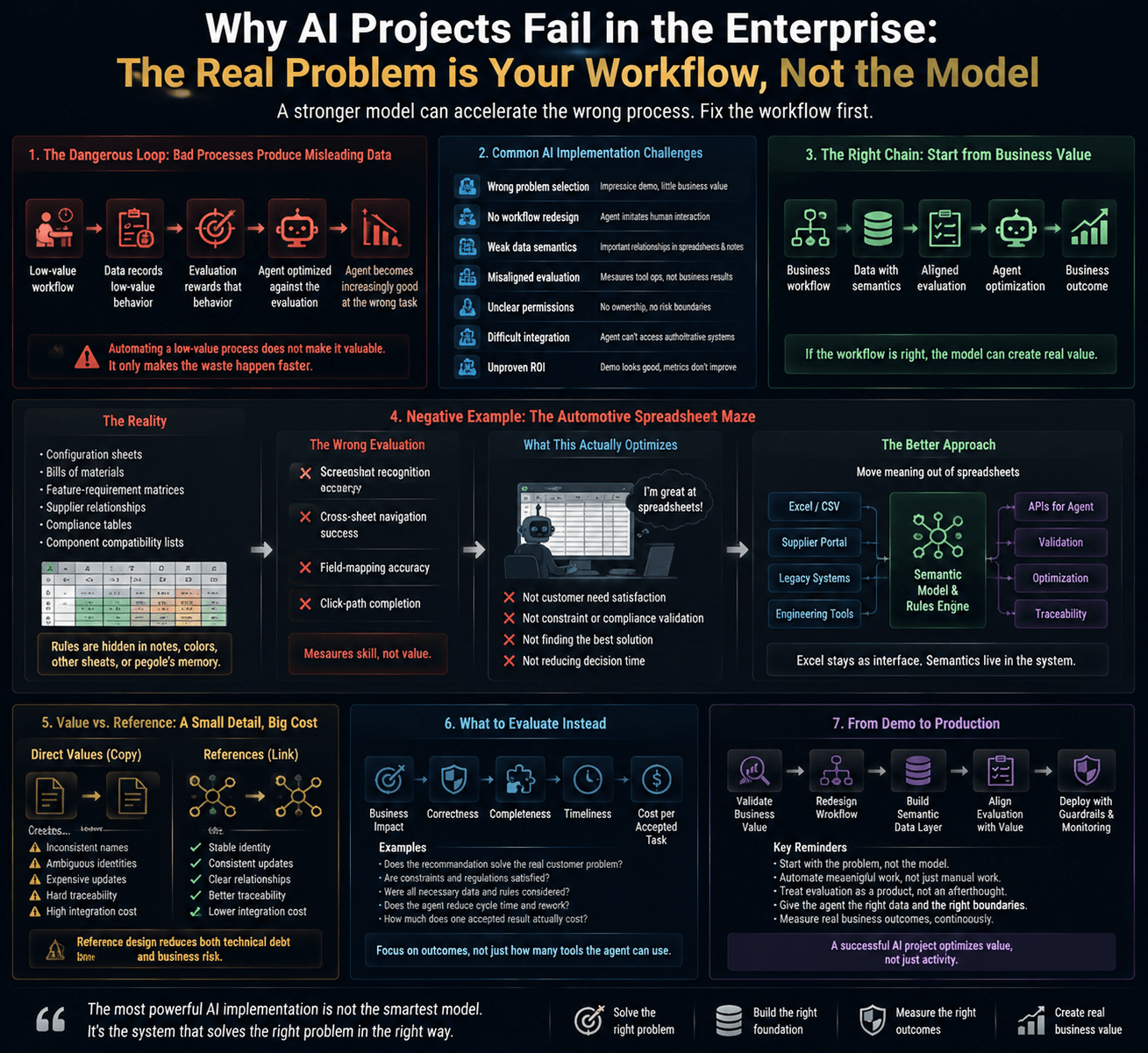
The Short Answer: What Makes AI Implementation Difficult?
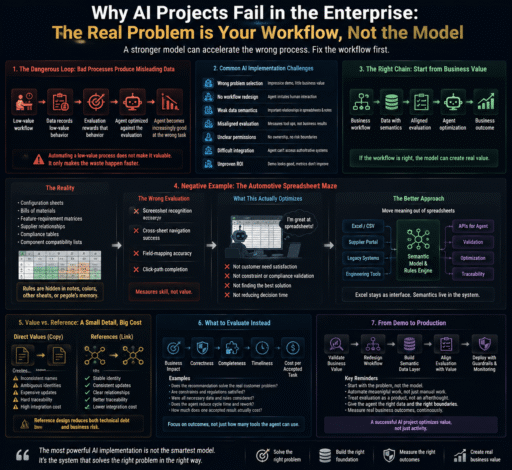
AI adoption is a system problem, not only a model problem.
| Challenge | Typical Symptom |
|---|---|
| Wrong problem selection | The use case is impressive but creates little business value |
| No workflow redesign | The Agent simply imitates human interaction with legacy tools |
| Weak data semantics | Important relationships exist only in spreadsheets and notes |
| Misaligned evaluation | The system measures tool operation instead of business results |
| Unclear permissions | Nobody knows what the Agent may do or who owns the risk |
| Difficult integration | The Agent cannot reliably access authoritative business systems |
| Unproven ROI | The demo looks good, but cycle time and error rates do not improve |
One of the most dangerous chains is:
Business workflow
→ Data
→ Evaluation
→ Agent optimization
→ Business outcome
If the workflow at the beginning has little value, every later stage can optimize the wrong objective.
A Dangerous Loop: Bad Processes Produce Misleading Data
Teams often begin an AI project by collecting historical data.
A better first question is:
Was this data produced by a valuable and well-designed business process?
If not, the project may enter the following loop:
Low-value workflow
↓
Data records low-value behavior
↓
Evaluation rewards that behavior
↓
The Agent is optimized against the evaluation
↓
The Agent becomes increasingly good at the wrong task
The data is “toxic” not because it was maliciously altered, but because it encodes the wrong objective.
Examples may include:
- Forms created only for administrative traceability;
- Repeated copying between disconnected systems;
- Approval steps caused by legacy software limitations;
- Manual consistency checks that the system should enforce;
- Reports that are generated but rarely used.
Automating such work may improve activity metrics without improving the business.
Automating a low-value process does not make it valuable. It only makes the waste happen faster.
Compliance and Approval Are Not Automatically Waste
This argument should not be taken too far.
In automotive, finance, healthcare, and manufacturing, many processes serve legitimate purposes:
- Regulatory compliance;
- Quality assurance;
- Accountability;
- Safety approvals;
- Version control;
- Incident investigation.
The right questions are:
- What risk does this step control?
- Does that risk still exist?
- Can the control be implemented more directly?
- Must people or Agents repeatedly enter the same data?
- Can audit evidence be generated automatically?
Agent-native design should remove unnecessary friction without deleting valid controls.
Negative Example: The Automotive Spreadsheet Maze
Automotive engineering and configuration management often depend on large matrices:
- Configuration sheets;
- Bills of materials;
- Feature-requirement matrices;
- Supplier relationships;
- Regulatory-compliance tables;
- Component-compatibility lists.
These spreadsheets often contain enormous numbers of fields, hidden dependencies, and complex references.
A rule may effectively mean:
Selecting option A
→ Excludes option B
→ Requires option C
→ Is allowed only in a specific market
The rule may exist in a note, a cell color, another worksheet, or the memory of an experienced engineer.
The Wrong Evaluation: Testing Spreadsheet Operation
Without redesigning the process, a team may define Agent capability as:
- Recognizing spreadsheet screenshots;
- Finding the correct cell;
- Navigating across worksheets;
- Reading comments and colors;
- Mapping fields;
- Reproducing an engineer’s click sequence.
The evaluation system may then measure:
Screenshot-recognition accuracy
Cross-sheet navigation success
Field-mapping accuracy
Click-path completion
Those metrics are measurable, but they may answer only one question:
Has the Agent become a skilled spreadsheet operator?
They do not tell us whether:
- The configuration satisfies the customer’s needs;
- The result violates a vehicle constraint;
- A regulatory issue was missed;
- All feasible solutions were found;
- Trade-offs were clearly explained;
- Decision time was reduced.
If the business goal is better engineering decisions, spreadsheet operation should not become the final objective.
Excel Is Not the Enemy
This does not mean every spreadsheet should be removed.
Excel may remain useful as:
- A familiar editing interface;
- A supplier-exchange format;
- An analysis tool;
- A reporting format;
- A human-review surface.
The real problem is whether critical business semantics exist only inside cells, colors, and notes.
A stronger design would:
- Structure the core entities;
- Assign stable identifiers;
- Move constraints into a rule engine;
- Preserve traceable relationships;
- Keep Excel as an input or presentation layer;
- Give the Agent access to semantic business APIs.
Excel can remain part of the system without carrying the entire meaning of the system.
Value vs. Reference: A Small Detail with a Large Cost
Enterprise tools often debate whether to copy a value directly or reference a shared object.
Direct values look convenient, but repeated copies create:
- Inconsistent names;
- Ambiguous identities;
- Expensive consistency checks;
- Additional retrieval work for the Agent;
- New evaluation dimensions that should not be necessary.
Stable references can preserve identity, but poorly designed interfaces may force users to navigate through long directory trees and lose their original context.
The better pattern is:
Use stable references underneath, while displaying the necessary information directly in the current context.
The system should maintain relationships. Humans and Agents should not have to repeatedly reconstruct them.
Positive Example: An Agent-Native Vehicle Configuration Flow
Imagine that a customer no longer starts with a dense spreadsheet.
They simply say:
“I want a car with a panoramic roof, at least 600 kilometers of range, and a budget below 250,000 yuan.”
The system still needs models, batteries, pricing, regional rules, supply information, dependencies, and exclusions.
The difference is that these relationships are available through structured data and deterministic constraints.
The flow becomes:
Express intent
↓
Identify requirements and preferences
↓
Query authoritative product data
↓
Validate constraints
↓
Generate feasible options
↓
Explain trade-offs
↓
Receive user confirmation
The Agent may respond:
“Packages A and B satisfy your budget and roof requirement. Package A provides 650 kilometers of range but requires a lower audio tier. Package B keeps the premium audio system but offers exactly 600 kilometers. Which matters more to you?”
The Agent is no longer filling in a form.
It is helping the user understand constraints and make a decision.
A More Reliable Agent-Native Architecture
Agent-native design does not mean giving all business logic to an LLM.
A safer architecture is:
Natural-language request
↓
Agent: intent understanding and clarification
↓
Semantic business API
↓
Authoritative database / rule engine / constraint solver
↓
Deterministic verifier
↓
Agent: explanation and recommendation
↓
Human confirmation
The responsibilities are separated:
- The model understands and communicates;
- Business systems provide facts;
- Rule engines enforce deterministic constraints;
- Verifiers check validity;
- Humans approve high-risk decisions.
A knowledge graph is not always required. Relational databases, rules engines, configuration services, and constraint solvers may be equally appropriate.
The important question is whether the business meaning is stable, accessible, and verifiable.
What Should an Agent Evaluation Measure?
Once the workflow changes, the evaluation should change with it.
1. Intent Understanding
Did the Agent identify explicit requirements, missing information, and user priorities?
2. Constraint-Violation Rate
How often did the recommendation violate pricing, regional, regulatory, compatibility, or safety rules?
Deterministic constraints should be checked by software rather than judged only by another LLM.
3. Feasible-Solution Recall
Did the system identify a sufficiently complete set of valid options?
Finding one valid answer does not mean finding the best answer.
4. Recommendation Quality
Was the recommendation clear, useful, evidence-based, and aligned with the user’s priorities?
5. Clarification Efficiency
Did the Agent ask enough questions to avoid mistakes without making the interaction feel like an interrogation?
6. Business Completion Rate
Did the user complete a valid configuration, review, submission, or decision?
7. Human Intervention and Rework
How often did a person need to correct, restart, or override the Agent?
8. Cost and Latency
The real cost includes:
Model calls
+ Tool calls
+ Retries
+ Human review
+ Infrastructure
The most useful financial metric is cost per accepted business outcome.
GUI Tools and MCP: Avoid the Adapter-Layer Trap
When a system exposes only a graphical interface, teams often add:
- Screenshot recognition;
- OCR;
- Mouse and keyboard automation;
- Parsing scripts;
- Raw-field MCP tools;
- Additional monitoring and recovery.
These methods can be reasonable transition strategies when:
- The legacy system cannot be changed;
- No API exists;
- The business volume is limited;
- The team is validating a concept;
- Automation benefits clearly exceed maintenance costs.
The danger begins when adapter layers keep growing while nobody questions the underlying workflow.
MCP Is Not the Problem—Tool Semantics Are
MCP is a way to connect an Agent to external tools and data.
A weak MCP interface may expose operations such as:
get_raw_field_137
click_element_42
open_tab_8
A stronger interface exposes business actions:
search_vehicle_options()
validate_configuration()
explain_option_conflict()
list_compliant_variants()
compare_configuration_packages()
The first forces the Agent to imitate human interaction with a legacy tool.
The second allows it to perform meaningful business operations.
Agent-native design is not about always using or rejecting MCP. It is about whether the tool interface expresses stable business capabilities.
Seven Real AI Implementation Challenges
1. Choosing the Right Problem
A useful first project usually has:
- High frequency;
- Meaningful current cost;
- Verifiable output;
- Manageable risk;
- Available data;
- Users willing to change their workflow.
2. Redesigning the Workflow
Teams must separate business value from legacy-tool friction.
Some steps should remain, some should be automated, and others should disappear.
3. Establishing a Source of Truth
The system must define:
- Which data source is authoritative;
- Who maintains it;
- How often it changes;
- How conflicts are resolved;
- Whether the Agent may write to it.
4. Aligning Evaluation with Business Value
Offline evaluation should test accuracy and constraints.
Online measurement should include completion, rework, human takeover, cycle time, user adoption, and cost.
5. Controlling Permission, Reliability, and Security
Production Agents need:
- Least-privilege access;
- Approval for high-risk operations;
- Audit logs;
- Timeouts and circuit breakers;
- Idempotency and retries;
- Rollback;
- Tenant isolation;
- Prompt-injection defenses.
6. Assigning Ownership
A project needs clear owners for:
- Business workflow;
- Data;
- Evaluation;
- Security;
- Production operations.
Without ownership, every team optimizes a different goal.
7. Proving ROI
Useful measurements include:
- Average handling time;
- First-attempt completion;
- Rework time;
- Error rate;
- Expert-intervention rate;
- Cost per accepted task;
- Decision cycle time;
- User adoption.
Without a baseline, improvement cannot be proven.
A Practical AI Agent Implementation Method
Step 1: Begin with the Decision, Not the Interface
Do not begin by asking:
“Can the Agent operate this application?”
Ask:
“What decision or outcome does the user actually need?”
Step 2: Map the Workflow and Label Its Value
| Step Type | Recommended Action |
|---|---|
| Direct business value | Preserve and improve |
| Risk or compliance control | Preserve, but automate evidence where possible |
| Legacy-tool friction | Remove or redesign |
| Repeated data transfer | Automate or eliminate |
| No explainable value | Pause and reassess |
Step 3: Design a Small Semantic Toolset
Start with a few meaningful operations:
Search
Validate
Compare
Explain
Submit
Rollback
Each tool should define its input, output, permissions, side effects, errors, idempotency, and audit behavior.
Step 4: Build Evaluations from Valuable Real Cases
The evaluation set should include:
- Real business examples;
- Frequent mistakes;
- Boundary conditions;
- Difficult expert decisions;
- Historical incidents;
- Different ways users express the same intent.
It should also include a no-Agent baseline.
Step 5: Begin with Human-in-the-Loop Operation
Let the Agent recommend, explain, and flag risk before allowing it to execute automatically.
Expand permissions only after evidence shows that a specific task is reliable.
Trustworthy automation is earned gradually.
Final Thoughts: Do Not Use a Smarter Model to Accelerate a Broken Process
The most disappointing AI project is not one in which the model occasionally makes a mistake.
It is one in which a company spends significant time, data, and money building a highly capable operator for an outdated workflow.
The Agent clicks faster, fills more fields, and generates more reports.
The business does not improve.
Tool architecture also shapes our definition of intelligence:
- Give an Agent only screenshots, and intelligence becomes image recognition;
- Give it only a workflow engine, and intelligence becomes step execution;
- Evaluate only field completion, and intelligence becomes data entry.
A valuable Agent should instead help people:
- Express intent;
- Discover feasible options;
- Understand constraints;
- Make better decisions;
- Spend less attention on tool-generated friction.
When an Agent project fails to reach production, pause before upgrading the model or adding another adapter.
Ask:
Does this workflow create real value?
Does the evaluation reward business outcomes or tool operation?
If we redesigned the system today, would we still make people and Agents work this way?
Sometimes the project does not need a more intelligent model.
It needs the courage to redesign the process that the model was asked to automate.
Frequently Asked Questions
What Is the Biggest Challenge in AI Agent Implementation?
It is usually a combination of problem selection, workflow design, data quality, integration, evaluation, security, ownership, and ROI—not a single model limitation.
Does Agent-Native Design Require Replacing Every Legacy System?
No. Legacy systems may still support compliance and record keeping. Agent-native design focuses on providing structured, semantic, and verifiable interfaces.
Is Excel Unsuitable for AI Agents?
Not necessarily. Excel can remain useful for editing and reporting. The problem arises when critical business rules exist only in cells, colors, and comments.
Can MCP Make a Legacy Tool Agent-Native?
Not automatically. MCP solves connectivity. The quality of the result depends on whether the tools expose meaningful business operations or only raw interface details.
What Should an AI Agent Evaluation Measure?
Useful metrics include constraint violations, business completion, rework, human intervention, task duration, user satisfaction, and cost per accepted result.
Should an Agent Be Fully Autonomous from the Beginning?
Usually not. Start with recommendations and human approval, then expand autonomy when evaluation data demonstrates sufficient reliability.
Suggested References
Before publication, consider adding:
- Baseline data from the existing business process;
- Before-and-after cycle-time comparisons;
- Real error and human-takeover cases;
- Official documentation for the selected Agent, MCP, and evaluation frameworks;
- Primary sources for industry regulations and audit requirements.
Content note: This article presents a design methodology. Excel, GUI tools, workflow engines, and MCP are not inherently low-value. The decision to redesign them should consider business risk, migration cost, and measurable benefit.