
After using Codex for a while, I became convinced of one thing:
The same model can feel like two completely different products in different hands.
Some people use Codex to adjust CSS or write isolated functions. Others coordinate several Codex tasks at once to clarify requirements, implement modules, audit diffs, run tests, and maintain a long-running project.
The gap is not explained by clever prompting alone.
It comes from workflow.
The most frustrating Codex failure is not when it says, “I cannot do this.” It is when it works confidently and efficiently in the wrong direction—changing files, adding tests, and reorganizing code before you realize that it misunderstood the original requirement.
That is when the real cost of AI coding becomes clear:
The most expensive failure is not missing a line of code. It is completing the wrong task at high speed.
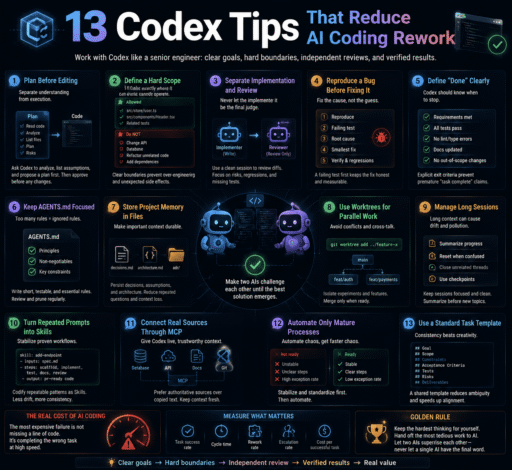
The following 13 techniques come from official documentation, community practices, and hands-on experience. They are not magic phrases. They are ways to make the objective, boundaries, and acceptance criteria clear before Codex begins executing.
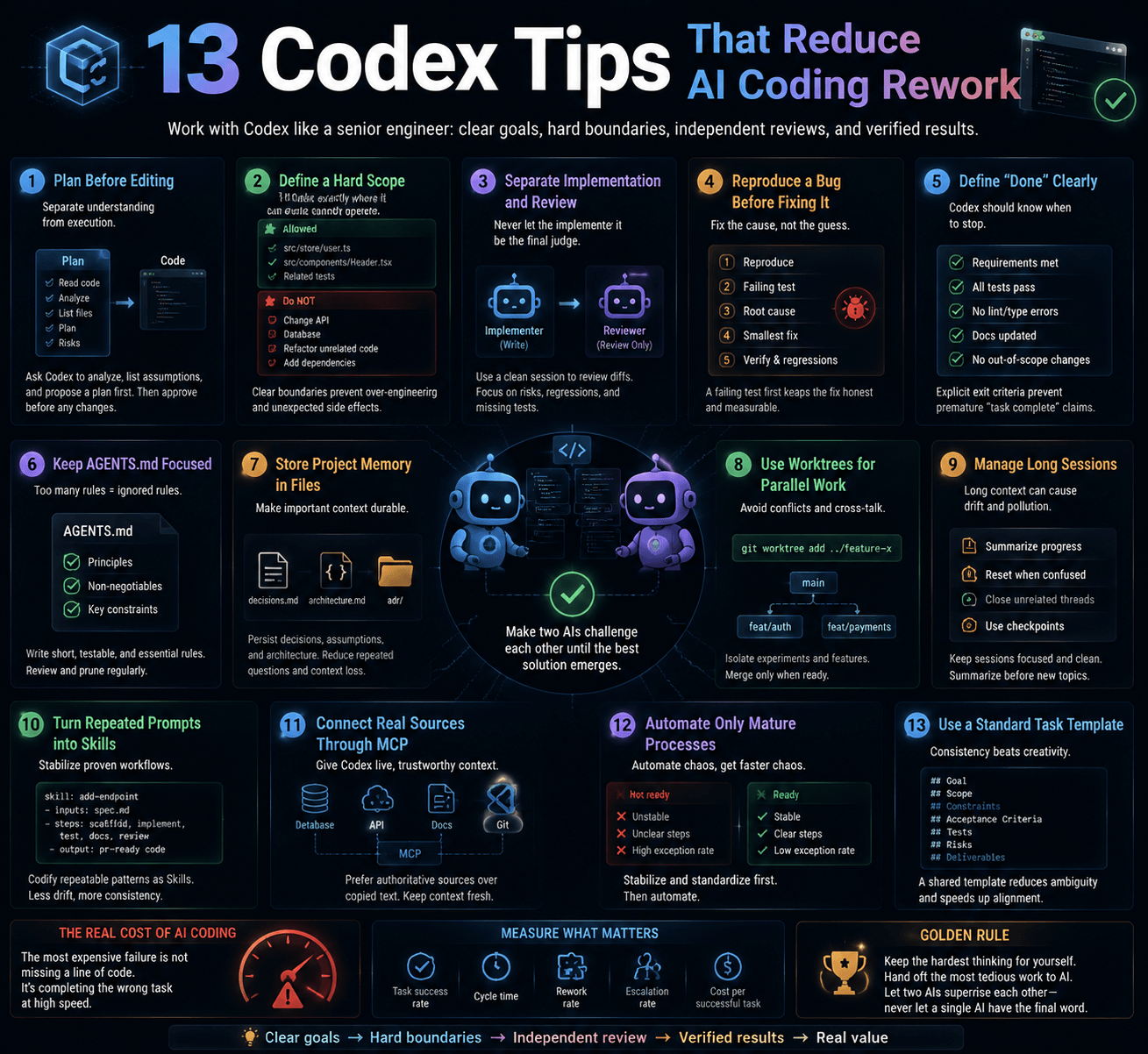
Quick Overview
| Technique | Problem It Solves |
|---|---|
| Plan before editing | Requirement misunderstandings |
| Define a hard scope | Unnecessary changes |
| Separate implementation and review | Self-confirmation |
| Reproduce bugs first | Fixes that do not solve the problem |
| Define “done” | Premature completion claims |
| Keep AGENTS.md focused | Weak or ignored rules |
| Store project memory in files | Context loss across sessions |
| Use Worktrees | Conflicting parallel changes |
| Manage long sessions | Context pollution |
| Turn repeated prompts into Skills | Workflow drift |
| Connect real sources through MCP | Incomplete copied context |
| Automate only mature processes | Scheduled chaos |
| Use a standard task template | Inconsistent execution |
1. Do Not Let the First Prompt Start Coding
Many failures begin with a request such as:“Improve the login feature in this project.”
The request feels clear, but Codex still has to guess:
- What does “improve” mean?
- Can it replace the authentication approach?
- Can it edit the database?
- Can it install dependencies?
- Can it refactor shared components?
- What counts as complete?
A safer first prompt is:
Do not modify any files yet.

First:

1. Read the repository structure and relevant code.
2. Explain the current implementation in your own words.
3. List the files you expect to modify.
4. Explain why each file needs to change.
5. Provide a staged implementation plan.
6. Identify possible regressions.
7. List assumptions and unresolved questions.
8. Explain how the result will be verified.

Stop after the plan and wait for approval.
If your client supports Plan mode, use it. Otherwise, natural-language instructions provide the same basic control.
This short delay often prevents hours of rework because it reveals whether Codex:
- Misunderstood the requirement;
- Plans to edit unrelated modules;
- Assumes it may add dependencies;
- Has no real validation strategy;
- Is treating guesses as facts.
Separate understanding from execution.
2. Draw a Hard Boundary Around the Task
Codex often does too much rather than too little.
A button fix becomes a component refactor. An API change becomes a type-system cleanup. A bug fix becomes an excuse to redesign nearby code.
Define the scope explicitly:
Task:
Fix the issue where the old avatar remains visible after logout.

Allowed files:
- src/store/user.ts
- src/components/Header.tsx
- Tests directly related to the issue

Do not:
- Change the API contract;
- Replace authentication;
- Modify the database;
- Upgrade dependencies;
- Refactor unrelated components;
- Reformat unrelated code.

If you discover an out-of-scope issue, report it but do not fix it.

If an out-of-scope file must be changed, explain why and stop
for approval.
For production systems, consider adding a rough diff budget:
The expected change should affect no more than four files.
If the actual scope becomes substantially larger, stop and
reassess the plan.
File counts and line counts do not prove risk, but they are useful warning signals.
3. Do Not Let the Implementer Perform the Final Review
A useful pattern is:
- One Codex session implements;
- A clean session reviews;
- Development pauses after each stage;
- Review focuses only on the current diff.
The implementation session may remain anchored to its earlier assumptions. A clean reviewer has a better chance of questioning them.
Use a focused review prompt:
Audit the current uncommitted changes. Review only; do not edit.

Check:

1. Whether the original problem is actually solved;
2. Behavioral regressions;
3. Null, concurrency, and error-handling risks;
4. Missing tests;
5. Out-of-scope changes;
6. Security, permission, and privacy risks;
7. Assumptions not supported by code or tests.

Classify findings as critical, high, medium, or low.

Every finding must include:
- File and location;
- Trigger condition;
- Practical impact;
- Smallest recommended fix.

Do not report issues without evidence.
Use /review where supported.
A second Codex session still does not guarantee correctness. The order of authority should be:
Explicit requirements
> Tests and runtime evidence
> Static analysis and security tooling
> Model review findings
The independent session reduces self-confirmation. It does not replace verification.
4. Reproduce a Bug Before Fixing It
“Fix this bug” often leads to code changes without proof that the original issue has disappeared.
Ask Codex to establish the failure first:
Do not fix the code yet.

1. Find a reliable reproduction.
2. Convert it into a failing test or minimal script.
3. Run it and confirm the current failure.
4. Record expected and actual behavior.
5. Identify the root cause.
6. Propose the smallest fix.
7. Wait for approval.
8. Apply the fix.
9. Confirm that the failing test now passes.
10. Run relevant regression tests and inspect the final diff.
The workflow becomes:
Reproduce
→ Failing test
→ Root-cause analysis
→ Minimal fix
→ Passing test
→ Regression validation
If the issue cannot be reproduced, Codex should report what it investigated and what additional logs or monitoring are required. It should not claim success based on intuition.
5. Define “Done” in Verifiable Terms
A good task description includes:
Goal
Context
Constraints
Done when
For example:
Completion criteria:
1. The original problem can be reproduced reliably.
2. The same reproduction no longer fails after the fix.
3. Existing relevant tests pass.
4. A regression test has been added.
5. Type checking passes.
6. No new lint errors exist.
7. No out-of-scope files were changed.
8. The final report lists changed files and validation commands.
9. Uncompleted checks are clearly identified.
10. Remaining risks are documented.
Avoid accepting:“The logic looks correct and should work.”
“Looks correct” is not a validation result.
6. Do Not Turn AGENTS.md into an Employee Handbook
AGENTS.md is useful, but longer is not necessarily better.
Keep rules that are:
- Frequent;
- Stable;
- Actionable;
- Testable;
- Expensive to violate.
Example:
# Project Rules

## Commands

- Install: `pnpm install`
- Develop: `pnpm dev`
- Test: `pnpm test`
- Type check: `pnpm typecheck`
- Lint: `pnpm lint`

## Change Policy

- Prefer the smallest viable change.
- Do not refactor unrelated code.
- Do not upgrade dependencies without approval.
- Treat the source-material directory as read-only.
- Check all callers before changing a public interface.
- Stop before expanding the approved scope.

## Git

- Do not commit, push, reset, or rebase without approval.
- Do not run cleanup commands that may delete uncommitted work.
- Do not modify unrelated user files.

## Final Report

- Work completed;
- Files changed;
- Validation commands and results;
- Checks not completed;
- Remaining risks.
Global, repository, and subdirectory instructions may have different scopes and priorities. Verify the current behavior in the Codex documentation.
A valuable maintenance rule is:If Codex repeats the same mistake twice, convert that failure into a short, testable AGENTS.md rule.
7. Store Project Memory in Files
Do not rely on chat history for a project that lasts weeks.
Useful project files include:
PROJECT.md       Goals, scope, and non-goals
PLAN.md          Current implementation plan
STATUS.md        Completed, active, and pending work
DECISIONS.md     Confirmed decisions and reasoning
RISKS.md         Risks, blockers, and open questions
CHANGELOG.md     Important changes
At the beginning of a task:
Read PROJECT.md, STATUS.md, DECISIONS.md, and the applicable
AGENTS.md files.

Then:

1. Summarize the current project state.
2. Explain how this task relates to existing decisions.
3. Stop if a conflict is found.
4. Produce the task plan.
At completion:
Update STATUS.md.

Update DECISIONS.md only when a new long-term decision has been
made. Do not rewrite confirmed history. If a decision is replaced,
add a new record that references the old one.
Project memory should be appendable and traceable, not rewritten from scratch after every task.
8. Use Worktrees for Isolated Parallel Work
When comparing architectures, do not make one session repeatedly destroy and replace its own implementation.
Use separate Git Worktrees:
A: Minimal fix
B: Structured refactor
C: Performance investigation only
D: Tests and benchmarks only
If your Codex client has built-in Worktree support, use it. Otherwise, native Git works:
git worktree add ../project-option-a -b option-a
git worktree add ../project-option-b -b option-b
Worktrees are useful for:
- Comparing implementations;
- Parallel front-end, back-end, and test work;
- High-risk refactors;
- Separating development from investigation;
- Running benchmarks against alternative solutions.
Each parallel task needs:
- An independent goal;
- An independent file scope;
- Acceptance criteria;
- A clear merge strategy;
- Non-conflicting ports and external resources.
Parallelism without decomposition only delays the conflict until merge time.
9. Manage Long-Running Context
Long sessions accumulate:
- Abandoned designs;
- Failed logs;
- Temporary assumptions;
- Old objectives;
- Irrelevant files;
- Conclusions that were later corrected.
Some clients may support commands such as:
| Command | Typical Purpose |
|---|---|
/compact |
Compress earlier context |
/fork |
Create a new technical branch of the conversation |
/resume |
Resume a previous session |
/review |
Review code changes |
/status |
Inspect session or environment state |
/agent |
Switch among supported Agent threads |
Use /help to check availability.
Even without these commands:
- Keep one coherent objective per session;
- Fork only when technical paths genuinely diverge;
- Start a new session after completion and restore context from project files.
A conversation that covers login, payments, deployment, and another login fix is not richly contextual. It is polluted by competing goals.
10. Turn Repeated Prompts into Skills
If you have copied the same prompt three times, it may be a reusable process.
Examples include:
- Pull-request review;
- API security review;
- Log investigation;
- Release-note generation;
- Front-end validation;
- Migration review;
- Standard test execution.
A conceptual Skill structure might look like:
.agents/skills/
└── review-api/
    ├── SKILL.md
    ├── checklist.md
    └── scripts/
The exact directory and installation model may vary by Codex version.
A Skill should define:
- When it applies;
- Required inputs;
- Execution steps;
- Allowed tools;
- Output format;
- Stop conditions;
- Actions requiring human approval.
A simple distinction is:
| Resource | Responsibility |
|---|---|
AGENTS.md |
Long-term project rules |
| Skill | Repeatable task workflow |
| Project-state files | Progress, decisions, and risks |
Keep each Skill focused on one task category.
11. Connect Codex to Real Sources Through MCP
Requirements, design files, tickets, logs, and production information often live outside the repository.
Manual copy-and-paste can lose:
- Issue comments;
- Log timestamps;
- Design states;
- Document context;
- Updated production information.
MCP or another controlled integration can support a workflow such as:
Read the ticket and acceptance criteria
→ Inspect the design
→ Review relevant code
→ Modify files
→ Start the application
→ Run tests or capture screenshots
→ Compare with acceptance criteria
→ Produce a review report
More tools require stronger controls:
- Begin with read-only access;
- Connect only high-value systems;
- Restrict accessible projects and data;
- Require approval for high-risk writes;
- Log tool calls and results;
- Defend against prompt injection from external content.
Access to GitHub does not imply permission to push. Access to Figma does not imply permission to modify the design system.
MCP supplies context. It does not establish trust.
12. Schedule Only Mature Processes
Scheduled tasks can generate daily summaries, inspect CI failures, scan for bugs, and prepare release notes.
However:Automation does not repair a chaotic process. It repeats it on schedule.
A practical heuristic is to automate only after:
The workflow has been run manually several times;
Inputs are reasonably stable;
Outputs are clearly defined;
Failure handling exists;
Permissions are understood;
Humans know how to validate the result.
For early automations:
- Use an isolated Worktree;
- Do not commit or push automatically;
- Avoid production credentials;
- Set time and resource limits;
- Report failures instead of retrying forever;
- Include changes, validation results, and unresolved risks.
13. A Reusable Codex Task Prompt
Please complete the following task.

[Goal]

Describe the final business result, not only the file to edit.

[Relevant Context]

List the files, directories, APIs, errors, designs, tickets,
and references.

[Allowed Scope]

- Files or modules that may be changed;
- Tests that may be added;
- Tools that may be used.

[Restrictions]

1. Do not perform unrelated refactoring.
2. Do not upgrade dependencies without approval.
3. Do not change the current API contract.
4. Do not modify database, authentication, or authorization logic.
5. Do not commit, push, reset, rebase, or clean without approval.
6. Report out-of-scope problems without fixing them.
7. Stop and explain before expanding scope.

[Execution Process]

1. Read AGENTS.md and the relevant code.
2. Restate the task in your own words.
3. List assumptions and unresolved questions.
4. Provide a plan and expected file list.
5. Wait for approval.
6. Implement the approved plan.
7. Run relevant tests.
8. Run type checking, lint, and build.
9. Inspect the final diff.
10. Validate each completion criterion.

[Done When]

1. The result can be verified reliably.
2. The original issue has reproduction evidence.
3. The regression test passes after the fix.
4. Existing relevant tests pass.
5. No new type or lint errors exist.
6. No out-of-scope changes exist.
7. Uncompleted checks are clearly disclosed.

[Final Response Only]

1. Work completed;
2. Files changed;
3. Validation performed and results;
4. Validation not completed;
5. Failed attempts;
6. Remaining risks;
7. Recommended next step.
Its value is not in sophisticated wording.
It separates the task into:
Understand
→ Plan
→ Approve
→ Execute
→ Verify
→ Report
Final Thoughts: The Best Codex Trick Is Not a Slash Command
Many users search for a hidden command that will suddenly make Codex smarter, faster, and more reliable.
The most useful techniques are less dramatic:
- Planning;
- Scope control;
- Diff inspection;
- Reproduction before repair;
- Evidence preservation;
- Independent review;
- Explicit acceptance criteria;
- Human approval for high-risk actions.
A clever prompt cannot permanently rescue a chaotic workflow.
A clear process, defined boundaries, and verifiable outcomes can make even a simple prompt perform much more reliably.
Codex does not only amplify coding ability. It also amplifies the quality of your requirements, your engineering discipline, and the disorder already present in your process.
The first step to using Codex better may not be finding another hidden command.
It may be making your development process worth automating.
Frequently Asked Questions
How Do I Stop Codex from Editing Too Early?
State in the first instruction that it may only read and plan. Require a file list, assumptions, risks, and validation plan before granting write permission.
How Long Should AGENTS.md Be?
There is no fixed length. Keep it concise, accurate, actionable, and focused on stable rules that matter frequently.
Are Two Codex Review Sessions Always More Reliable?
They reduce self-confirmation but do not guarantee correctness. Requirements, tests, runtime evidence, static analysis, and human judgment remain necessary.
Should Every Task Use a Worktree?
No. Worktrees are valuable for independent parallel changes, high-risk work, and alternative implementations. A small isolated edit does not need several Worktrees.
What Is the Difference Between a Skill and AGENTS.md?
AGENTS.md contains long-term repository rules. A Skill contains a repeatable task workflow. Project-state files preserve progress, decisions, and risks.
Should I Connect as Many MCP Tools as Possible?
No. More tools increase permissions, security risk, and context noise. Begin with one or two high-value, read-only integrations.
When Is a Scheduled Codex Task Appropriate?
After the workflow has been run manually several times and its inputs, outputs, failure handling, permissions, and validation process are stable.
References
- OpenAI Codex Documentation
- OpenAI Codex on GitHub
- Model Context Protocol Documentation
- Official Git Worktree documentation
- Documentation for the project’s test, lint, and CI tools
Feature note: Slash Commands, Worktrees, Skills, MCP integrations, and scheduled tasks may differ by Codex client, version, and account. Verify availability through /help and current official documentation before publication.