
The first time you use Claude Code, it may feel like another AI tool that can edit files, execute terminal commands, and help you understand a repository.
Then you open the awesome-claude-code GitHub repository.
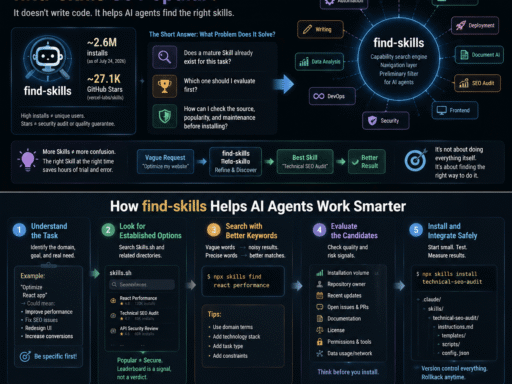
Inside, you find a growing collection of Agent Skills, workflows, Hooks, slash commands, configuration templates, security tools, alternative clients, and orchestration systems.
Some projects focus on code review and DevOps. Others cover scientific research, security scanning, documentation, or long-form writing.
At that point, Claude Code no longer looks like a single terminal application.
It starts to look like an ecosystem.
The Short Answer: Is Claude Code Really That Powerful?
Yes, but it is not magic.
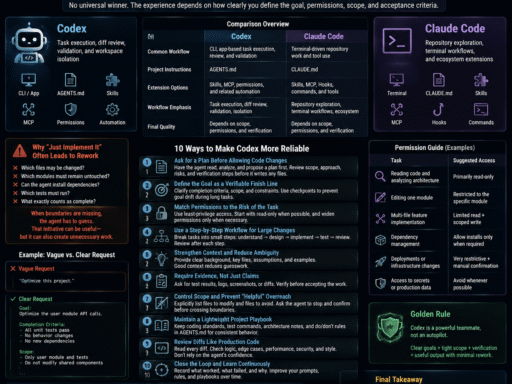
Claude Code is valuable because it can:
- Work with files, repositories, and developer tools;
- Be customized through Skills, Hooks, slash commands, and
CLAUDE.md; - Turn personal knowledge and team processes into reusable instructions.
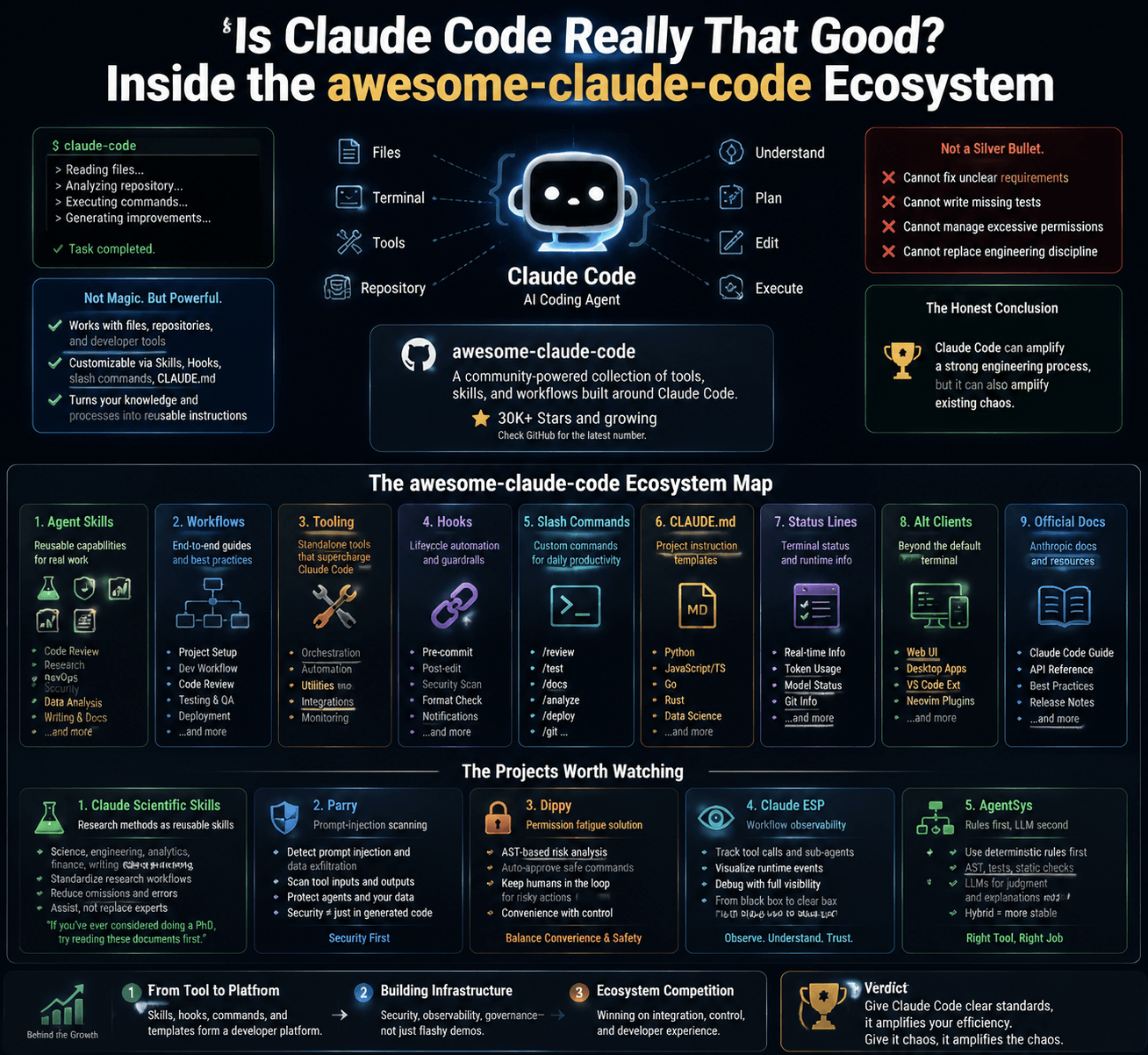
However, it cannot automatically fix unclear requirements, missing tests, excessive permissions, or poor engineering discipline.
A more honest conclusion is:
Claude Code can amplify a strong engineering process, but it can also amplify existing chaos.
What Is awesome-claude-code?
awesome-claude-code is a community-maintained directory of tools and resources built around Claude Code.
It is not an official Anthropic marketplace, and inclusion does not mean that every project has been reviewed or endorsed by Anthropic.
Think of it as an ecosystem map.
At the time reflected in the original source material, the repository had already attracted tens of thousands of GitHub Stars. Because GitHub metrics change continuously, readers should check the repository for the latest number.
Its resources are organized into nine major categories:
| Category | What It Covers |
|---|---|
| Agent Skills | Reusable capabilities for code review, research, DevOps, writing, and more |
| Workflows | End-to-end tutorials, use cases, and best practices |
| Tooling | Standalone utilities and orchestration tools |
| Hooks | Lifecycle automation for formatting, security checks, and notifications |
| Slash Commands | Custom commands for Git, testing, analysis, and documentation |
| CLAUDE.md | Project instruction templates for different languages and domains |
| Status Lines | Terminal status-line extensions and runtime information |
| Alternative Clients | Third-party interfaces beyond the default terminal experience |
| Official Docs | An index of Anthropic documentation and official resources |
Individually, these categories may look like a curated list. Together, they resemble the early foundations of a developer platform.
Five Projects and Ideas Worth Watching
The repository contains too many projects to explore in one sitting. The following examples represent some of the most important directions in the Claude Code ecosystem.
1. Claude Scientific Skills: Turning Research Methods into Reusable Instructions
Claude Scientific Skills is a collection of Agent Skills for research, science, engineering, analytics, finance, and writing.
One community description jokes:
“If you have ever considered doing a PhD, try reading these documents first.”
Installing a Skill does not make someone a scientist, nor can it replace professional training. The more important point is that complex research methods are being converted into structured instructions that AI tools can follow.
Such Skills may help users:
- Build more complete research workflows;
- Reduce omissions during analysis;
- Standardize how sources and findings are organized;
- Create consistent report structures;
- Reuse proven methods across similar tasks.
They should still be treated as assistants. Scientific validation, peer review, and expert judgment remain essential.
2. Parry: Prompt-Injection Scanning for AI Development Workflows
As coding agents begin reading source code, documentation, websites, and tool outputs, prompt injection becomes a software-development risk.
Malicious instructions could be hidden in:
- README files;
- Third-party documentation;
- Web pages;
- Tool responses;
- Data files processed by an agent.
According to its project description, Parry uses Hooks to scan tool inputs and outputs for potential prompt injection, secret exposure, and data exfiltration.
This direction matters because AI coding security is no longer limited to asking whether generated code contains a vulnerability.
We also need to ask:
What did the agent read, what did it trust, and what data is it about to send elsewhere?
No scanner can guarantee complete protection. Production systems still require least-privilege access, isolation, human review, and professional security testing.
3. Dippy: Addressing Permission Fatigue
Frequent users of coding agents are familiar with permission fatigue.
The agent requests permission to run one command, read another directory, or execute a tool. After enough interruptions, users may begin approving requests without reading them carefully.
That is precisely when a security control can become ineffective.
According to its listing, Dippy uses AST-based analysis and related techniques to identify lower-risk commands. Safer operations may be approved automatically, while potentially dangerous ones remain subject to user confirmation.
The idea is compelling, but it comes with an important warning:
Any automatic approval system expands execution authority.
Developers should inspect its rules, restrict its scope, and test it in an isolated environment before using it with sensitive repositories.
Convenience should not come at the cost of control.
4. Claude ESP: Making Agent Workflows Observable
When Claude Code starts modifying files, calling tools, or launching sub-agents, developers often ask:
“What is it doing right now?”
Tools such as Claude ESP aim to display runtime events, tool activity, sub-agent status, and other observable information in a terminal interface.
This should not be described as unrestricted access to a model’s complete private chain of thought. Its practical value is workflow observability.
That can help developers:
- Track tool-call sequences;
- Identify where a task has stalled;
- Monitor sub-agent activity;
- Detect repeated calls or abnormal loops;
- Debug without constantly interrupting the main session.
As agent workflows become longer and more autonomous, observability will move from a useful extra to a basic requirement.
5. AgentSys: Use Deterministic Rules Before Asking an LLM
AgentSys represents an important engineering principle:
If a rule-based system can determine something reliably, do not ask an LLM to guess.
Regular expressions, AST analysis, static checks, and test suites can handle many deterministic tasks. LLMs are more useful for semantic interpretation, ambiguous decisions, and explanations.
A hybrid workflow might:
- Use AST analysis to inspect code structure;
- Run tests to verify behavior;
- Apply deterministic rules to detect known violations;
- Ask an LLM to explain the findings and recommend changes.
This architecture is often more stable than sending every step to an AI model.
The future of production AI coding may not be about letting models control everything. It may be about placing models exactly where judgment is required.
Three Signals Behind the Growth of the Claude Code Ecosystem
The repository is interesting by itself, but the larger trends behind it matter even more.
Signal 1: Claude Code Is Evolving from a Tool into a Platform
A tool solves a specific problem. A platform allows users to build their own capabilities around it.
Claude Code now has an ecosystem that includes:
- Agent Skills;
- Lifecycle Hooks;
- Custom slash commands;
CLAUDE.mdproject instructions;- Sub-agents and orchestration tools;
- Configuration and usage management;
- Third-party clients;
- Status-line extensions.
These components allow different teams to use the same underlying model in very different ways.
A company can encode its coding standards, testing requirements, deployment process, and security policies. Claude Code can then work within those constraints.
Compatibility across AI coding tools should not be assumed, however. Some Skill concepts and document formats may be reusable, but actual support depends on the tool and version.
Signal 2: The Community Is Building Infrastructure, Not Just Demos
Early ecosystems are often filled with entertaining experiments.
Maturing ecosystems begin producing less glamorous but more important infrastructure:
- Security scanning;
- Permission management;
- Logging and observability;
- Usage monitoring;
- Configuration management;
- Multi-agent orchestration;
- Workflow testing;
- Version and policy control.
These tools do not attract attention as easily as “build an entire app from one prompt,” but they determine whether coding agents can be trusted in professional environments.
When developers start discussing audit trails, permission boundaries, cost controls, and workflow drift, the ecosystem is moving beyond the toy stage.
Signal 3: AI Coding Tools Are Competing on Ecosystems
In the early days of AI coding, comparisons between Claude Code, Cursor, GitHub Copilot, and other tools focused on one question:
“Which one writes better code?”
As model capabilities improve, that question becomes less decisive.
Developers are increasingly evaluating:
- Integration with existing workflows;
- Support for team-specific standards;
- Availability of Skills and extensions;
- Permission controls;
- Debugging and observability;
- Reusability of team knowledge;
- Switching and migration costs.
The history of Visual Studio Code shows how strongly an extension ecosystem can influence developer adoption.
However, repository Stars and plugin counts only indicate attention. They do not automatically prove quality. Maintenance, security, documentation, and real-world results matter more.
Who Should Use Claude Code?
Claude Code is not the best answer for every developer or task.
| Use Case | Recommendation | Why |
|---|---|---|
| Understanding and modifying large repositories | High | It can work with repository context, files, and tools |
| Automating repetitive development workflows | High | Skills, Hooks, and commands can encode repeatable processes |
| Enforcing team coding standards | High | Rules can be documented in CLAUDE.md or reusable Skills |
| Simple one-off code completion | Medium | A lighter IDE assistant may be more efficient |
| Working with production secrets | Use caution | Least-privilege access and security controls are essential |
| Editing critical code without tests | Use caution | AI output does not replace testing or human review |
If you only need occasional code completion, the complete Claude Code workflow may feel excessive.
If you work with large repositories and repeatable multi-step tasks every day, its value becomes much easier to see.
What Should Developers Do Now?
You do not need to install dozens of projects at once. The most effective approach is to begin with one recurring problem.
1. Choose Two or Three Resources That Solve Real Problems
Ask yourself:
- Which task do I repeat every day?
- Which code-review issue is often missed?
- Which interruption breaks my concentration?
- Which team rule is difficult to enforce?
One Hook that saves ten minutes every day is more valuable than ten Skills you never use.
2. Create Your Own CLAUDE.md or Skill
A Skill does not have to be mysterious. In many cases, it begins as a well-structured set of instructions.
You can document:
- Repository structure;
- Framework and version requirements;
- Naming and coding conventions;
- Files that must not be modified;
- Testing commands;
- Pull-request review checklists;
- Deployment and rollback processes;
- Security and privacy requirements.
The goal is not to write the longest possible file. The goal is to make each rule clear, actionable, and testable.
3. Put Security Before Automation
Before installing a third-party Skill, Hook, or script, check:
- Who maintains the project;
- When it was last updated;
- What its installation script executes;
- Whether it reads environment variables;
- Whether it sends data over the network;
- Whether it uploads code or logs;
- Whether it requests elevated permissions;
- Whether command execution is restricted;
- Whether versions can be pinned;
- Whether it can be tested in a sandbox.
Do not assume that a popular repository is automatically safe.
GitHub Stars measure attention, not security assurance.
4. Measure Whether It Actually Helps
After using a tool for a reasonable period, track:
- Time saved per task;
- Human correction rate;
- Tool-call failure rate;
- Reduction in repetitive work;
- New security risks introduced;
- Token and API costs.
AI tools can create a strong feeling of productivity. Real productivity should still be measurable.
Will Claude Code Replace Developers?
In the near term, “redistribute work” is more accurate than “replace developers.”
Claude Code can help developers:
- Understand unfamiliar repositories;
- Perform repetitive edits;
- Generate tests and documentation;
- Execute multi-step tool workflows;
- Automate team processes.
It still cannot reliably replace:
- Deep business understanding;
- Architectural trade-offs;
- Risk ownership;
- Cross-team communication;
- Final accountability.
An AI tool can generate code. It cannot automatically determine whether that code should exist in the first place.
That remains a human responsibility.
Final Verdict: The Real Power Is in How You Use Claude Code
So, is Claude Code really that good?
Yes—but not because every answer is correct, and not because a GitHub repository has accumulated a large number of Stars.
Its real strength is that developers can continuously encode their own knowledge, rules, and workflows into the tool.
AI coding assistants were once mostly generic products that behaved similarly for everyone. They are now becoming customizable collaborators that can work according to the habits of an individual developer or an entire team.
But there is an important lesson:
Give Claude Code clear standards, and it may amplify your efficiency. Give it a chaotic process, and it may amplify the chaos.
The next phase of AI coding is not only about generating better code. It is about building tools that understand projects, follow rules, and remain observable and controllable.
That may be the most important message behind awesome-claude-code.
It is not merely showing us how popular one tool has become. It is showing us how developers are learning to work with AI as part of everyday software engineering.
Frequently Asked Questions
Is awesome-claude-code an official Anthropic repository?
No. It is a community-maintained directory. Projects listed in the repository are not necessarily reviewed or endorsed by Anthropic.
Are Claude Code Skills safe to install?
Not automatically. A Skill may require tools, file access, network access, or specific permissions. Review its documentation and source code before installation.
What is the difference between CLAUDE.md and a Skill?
CLAUDE.md typically describes project-specific context, constraints, and development rules. A Skill is usually a reusable capability or workflow. They can be used together.
Is Claude Code suitable for beginners?
Yes, but beginners should not accept every change without review. A safer starting point is code explanation, test generation, and small, reversible edits.
Are third-party Claude Code Hooks secure?
Security varies by project. Hooks may read files, execute commands, or access the network. Always inspect their permissions, source code, and data flow.
Sources
- awesome-claude-code GitHub repository
- Anthropic’s official Claude Code documentation
- Official GitHub pages and README files for the referenced projects
Data note: GitHub Stars, installation numbers, and project status change over time. Recheck them on the publication date. Predictions about Claude Code’s share of GitHub commits should include the original report, publication date, and methodology, and must be clearly labeled as forecasts rather than established facts.