
Most people aren’t unwilling to start using AI. The real problems are:
-
They don’t know how to start
-
They start the wrong way
-
They’ve been misled into focusing too much on technical details, which creates unnecessary anxiety
So the goal of this article is simple: to show you what you can actually do to get started.
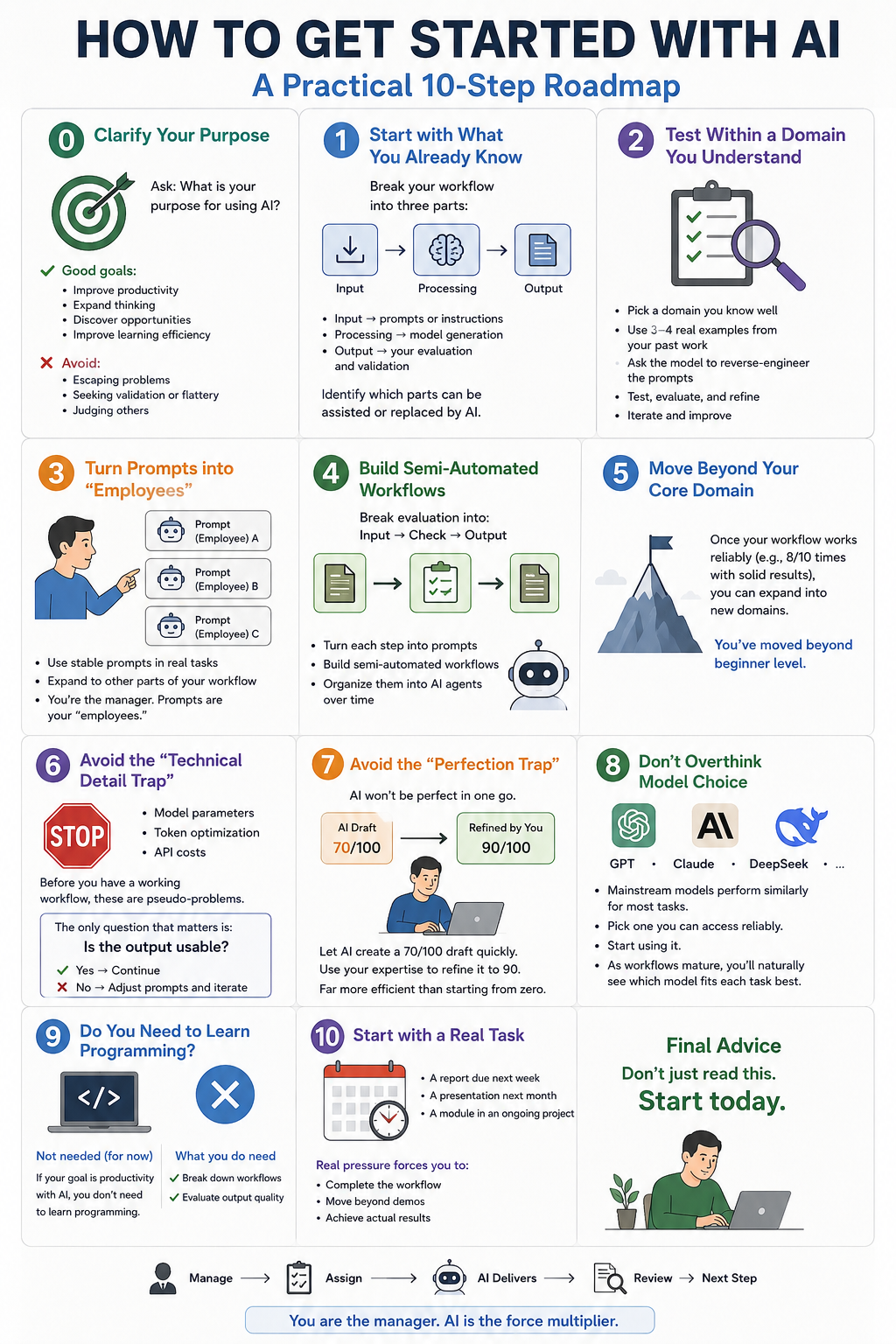
Step 0: Clarify Your Purpose
Before anything else, you need to answer a fundamental question:
What is your purpose for using AI?
There are some purposes you should actively avoid:
-
Escaping real-life problems
-
Replacing real social relationships with AI validation or flattery
-
Using AI as a tool to judge others (e.g., calling others “lazy” for using AI, while seeing yourself as “smart” for doing the same)
Under a more constructive and healthy framework, your goals should be:
-
Improve productivity and output quality in your main job or side projects
-
Expand your thinking with multiple perspectives and develop more complex reasoning
-
Discover new income opportunities or side skills
-
Improve learning efficiency
The last point—learning efficiency—can already be achieved through what I call on-demand learning, especially when combined with large language models.
Step 1: Start with What You Already Know
Look at areas where you already have:
-
Professional expertise
-
Hands-on experience
-
Deep personal interest
Then break down your workflow into three parts:
-
Input
-
Processing
-
Output
Now identify which parts can be assisted or replaced by AI.
-
Input → prompts or AI instructions
-
Processing → model generation
-
Output → your evaluation and validation
Step 2: Test Within a Domain You Understand
Pick a domain where you can confidently judge right from wrong.
Do NOT start by studying prompt engineering in isolation.
Instead:
-
Take 3–4 real examples from your past work
-
Feed them into the model
-
Ask it to reverse-engineer the prompts
-
Use those prompts and test results
-
Iterate and refine
Step 3: Turn Prompts into “Employees”
Once your prompts become stable:
-
Use them in real tasks
-
Expand to other parts of your workflow
Over time, you’ll reach a new working mode:
-
You become the manager
-
Each prompt becomes an “employee”
-
You assign tasks → AI delivers → you review → move to the next step
Step 4: Build Semi-Automated Workflows
Take it further:
-
Break your evaluation process into input → check → output
-
Turn those into prompts as well
Eventually, you’ll build a set of semi-automated workflows in areas you understand well.
At this stage, you can begin organizing them into AI agents.
Step 5: Move Beyond Your Core Domain
Once your workflow works reliably (e.g., 8 out of 10 times producing solid results):
-
You’ve moved beyond beginner level
-
You can now expand into unfamiliar domains
Step 6: Avoid the “Technical Detail Trap”
At some point, you’ll feel tempted to focus on:
-
Model parameters
-
Token optimization
-
API costs
Stop.
Before you have a working workflow, these are pseudo-problems.
The only question that matters is:
Is the output usable?
-
If yes → continue
-
If no → adjust prompts and iterate
Step 7: Avoid the “Perfection Trap”
Many people expect AI to produce perfect results in one go.
It won’t.
And that leads to:
-
Doubting AI
-
Doubting yourself
-
Doubting the entire approach
The correct way to use AI:
-
Let it generate a 70/100 draft quickly
-
Use your expertise to refine it to 90
This is far more efficient than starting from zero.
Step 8: Don’t Overthink Model Choice
People often ask: “Which model should I use?”
At your current stage, it doesn’t matter much.
Mainstream models (GPT, Claude, DeepSeek, etc.) perform similarly for most use cases.
-
Pick one you can access reliably
-
Start using it
Once your workflows mature, you’ll naturally see which model works best for each task.
Until then, model choice is not your bottleneck.
Step 9: Do You Need to Learn Programming?
If your goal is simply to improve productivity with AI:
No, you don’t need to learn programming.
What you do need:
-
The ability to break down workflows
-
The ability to evaluate output quality
These skills matter far more than coding.
Step 10: Start with a Real Task
Don’t approach this with a “just trying it out” mindset.
Instead, pick something real with a deadline:
-
A report due next week
-
A presentation next month
-
A module in an ongoing project
Real pressure forces you to:
-
Complete the workflow
-
Move beyond demos
-
Achieve actual results
Final Advice
Don’t just read this.
Start today.